
The NMAT explained7-minute readFor takers preparing for the online NMAT
The online NMAT: proctoring rules, setup and a test-day checklist
The online NMAT is live-proctored with webcam and microphone on, and physical calculators are prohibited. Rules, room setup and a test-day checklist.
If you are preparing for the online NMAT, the rules matter as much as the content. The test is live-proctored, your webcam and microphone stay on, and a long list of items is prohibited, including physical calculators. A rule you misread on the morning of the test is a bad place to learn it.
This post sets out the proctoring rules as the Center for Educational Measurement (CEM) states them, then gives conventional advice on room, device and routine. The rules are CEM's. The setup advice is ours, and it is general: where CEM has a technical requirement, its own page governs.
How is the online NMAT proctored?
The online NMAT is live-proctored, which means a person watches your sitting in real time. CEM's test-day instructions state that your webcam and microphone must remain on throughout the test (CEM, Test Day Instructions).
Two practical points follow. First, you will be on camera for the whole sitting, which runs close to four hours counting the reminders, both parts and the break (see our format guide). Second, the proctor can ask you to show materials. CEM says scratch work is allowed only with authorized materials, which you must show the proctor on request. The page does not list those materials in the text we reviewed, so read the current instructions and follow them exactly.
Being watched is unusual for many takers, and it can raise anxiety on its own. We cover that in our post on NMAT anxiety in a proctored online test.
What may you use, and what is prohibited?
Almost nothing from your desk may be used. CEM prohibits phones, tablets, e-readers, wearables, watches and physical calculators. It also prohibits books, notes, dictionaries, translators, and pencils, erasers, markers and pens. You may not leave the room or navigate away from the test site (CEM, Test Day Instructions).
| Category | Status under CEM's instructions | What to check |
|---|---|---|
| Physical calculator | Prohibited | Practise every quantitative item without one |
| Phone, tablet, e-reader | Prohibited | Put them out of reach before you start |
| Watch or other wearable | Prohibited | Take it off; use the on-screen clock |
| Books, notes, dictionaries, translators | Prohibited | Clear the desk and the wall |
| Pencils, erasers, markers, pens | Prohibited | Do not keep them within reach |
| Leaving the room | Prohibited | Use the 10-minute break; plan before you begin |
| Scratch work | Only with authorized materials shown on request | Read the current instructions |
This table is a summary of the page as we read it. If CEM updates its instructions, its page is the authority.
Why do the online NMAT rules feel strict?
The rules are strict because the test ranks applicants against each other, and a ranking is only fair when everyone sits under the same conditions. CEM's list covers devices, reference material and writing tools, and it bans leaving the room, which is the usual route for outside help.
For you, the practical lesson is to remove temptation and ambiguity before the clock starts. If a watch is on your wrist out of habit, it is a rule problem. If a phone sits on the desk "on silent", it is a rule problem. Clear them away, and the rules stop being something you have to think about during the test.
How do you set up your room and device?
Choose a quiet, closed room, a stable connection and a device you have already tested, and do this several days before the test. CEM's page tells you what is prohibited. It is general advice, not a CEM requirement, that the following setup reduces the chance of a problem.
- Room: one door you can close, a clear desk and a plain wall behind you. Tell people at home that you cannot be interrupted for roughly four hours.
- Lighting: a light in front of you or beside you, not behind you, so your face is clear on camera.
- Camera and microphone: test both in the same room and at the same time of day you will sit. Both must stay on.
- Power: plug in, and keep a charger in reach.
- Connection: use a wired or strong connection, and close other apps and tabs. Navigating away from the test site is prohibited.
Do a full rehearsal at least once. Sit at the desk, open a timed set, and keep to the rules for the whole block. Our last-month tips place this rehearsal in a week-by-week plan.
How do you prepare for no-calculator maths?
Practise quantitative items without a calculator from the start, so the rule costs you nothing on the day. The Quantitative subtest covers fundamental operations, problem solving and data interpretation (CEM, Brief Description of the Test), and Part 1 gives about 67.5 seconds an item on average.
That pace does not leave room for long division. What replaces the calculator is a short list of habits: knowing common fraction-to-percent pairs, estimating before computing, cancelling common factors, and checking that an answer has the right size. We teach these in our guide to NMAT quantitative without a calculator.
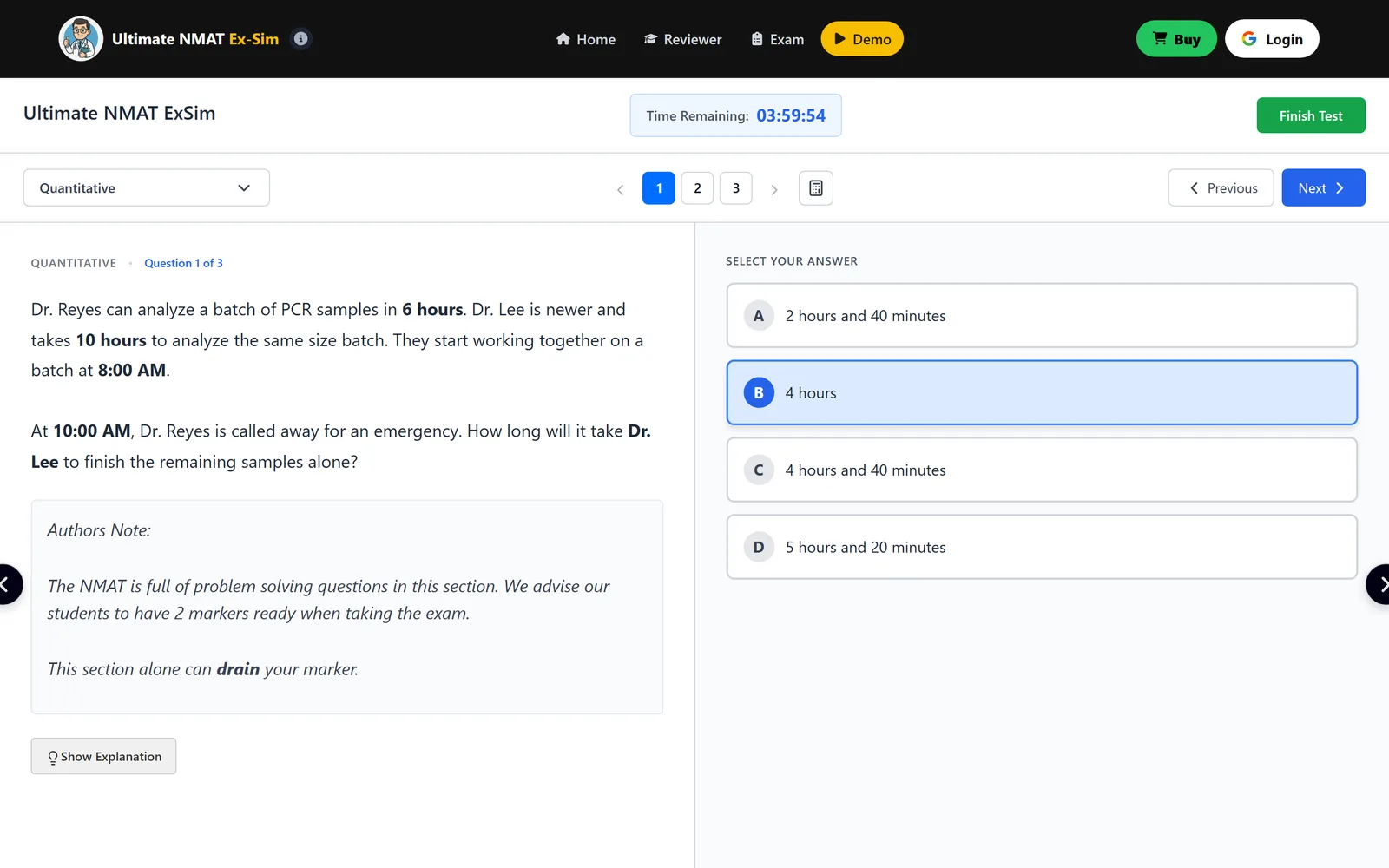
The image below shows a Quantitative work-rate item in our demo. An option is highlighted in the screenshot, but that is practice in progress, not the answer. The correct choice is 4 h 40 min. Work it out on paper first, then compare.
What if something goes wrong during the test?
Stay in your seat and follow CEM's instructions rather than improvising. The pages we rely on do not describe what happens after a connection drop or a proctor message, so we will not guess. Read the current Bulletin of Information that CEM links from its NMAT page, and note the contact route it gives for test-day problems.
What you can control is the list of things that commonly go wrong in any online sitting. Check them the day before.
- Power: a laptop on battery alone is a risk, so plug in.
- Connection: know where the router is, and ask others at home to stay off heavy downloads and video calls.
- Noise: warn neighbours, family members and pets' owners; tell them the sitting is close to four hours.
- Updates: restart the device the day before and install pending updates then, not on test morning.
Leaving the room is prohibited, so do not "just step out" to fix a problem. Raise it through the channel CEM gives you.
What should you do on test day?
Arrive early, in the sense of being ready early: be seated, tested and settled before the reminders page opens. Use this checklist the evening before and again the morning of the test.
- Rules: reread CEM's test-day instructions in full.
- Room: desk clear, door closed, household told.
- Device: charged, plugged in, camera and microphone tested.
- Prohibited items: phone, watch and any calculator out of reach.
- Body: eat, drink water and use the bathroom before you start.
- Break plan: the break is 10 minutes. Decide now what you will do with it.
- Pace plan: know your Part 1 and Part 2 targets (see NMAT time management).
You have 12 minutes of reminders and the certifying statement before Part 1 begins, per CEM's schedule. Do not spend your calm reading them for the first time. Read them in advance on CEM's pages, and use those minutes to breathe.
If you want to practise the look and feel before test day, the free demo runs in a browser with the clock and subtest menu. It does not replicate proctoring, which only the real test has.
Frequently asked questions
Can I use a calculator on the online NMAT?
No physical calculator is allowed. The Center for Educational Measurement (CEM) lists physical calculators among prohibited items on its test-day instructions page, alongside phones, tablets, watches and notes. Practise quantitative items without one so the rule costs you nothing.
Is the online NMAT proctored?
Yes. CEM describes the online NMAT as live-proctored, meaning a person monitors your sitting in real time. You may be asked to show authorized materials if you do scratch work, so read CEM's current test-day instructions before your sitting.
Is a webcam required for the online NMAT?
Yes. CEM states that your webcam and microphone must remain on throughout the test. Test both in the room you will use, at the time of day you will sit, and keep the device plugged in.
Can I leave the room during the online NMAT?
No. CEM prohibits leaving the room and navigating away from the test site during the test. The only scheduled pause is the 10-minute break between Part 1 and Part 2, so use the bathroom and drink water beforehand.
Sources
From the publisher
Meet the NMAT clock here first.
Ultimate NMAT is an NMAT simulator: full-length practice exams and subtest drills in all eight NMAT subtests, sat on a clock, with an explanation behind the items instead of a bare answer key.
- 4,670 practice items in all eight NMAT subtests
- nine full-length practice exams (A to I), 2,320 items
- eight subject drill tracks of ten sets each, 2,350 items
- An interactive reviewer and simulation lab beside the question bank
Try the free NMAT simulator demo A short sample in all eight subtests. No account needed.
About this article
Written by the Ultimate NMAT editorial team, who build the Ultimate NMAT Ex-Sim. Exam facts are checked against the Center for Educational Measurement (CEM) test pages and the CHED issuances CEM cites, and every article lists its sources. How we write and check our articles.
First published .